
Robot Vacuum Threshold Height and How to Measure It
Measure robot vacuum threshold height, compare single and double steps, and check Roborock Saros 10 limits with a room connection worksheet before you buy.
Measure robot vacuum threshold height from the floor on each side to the highest point along the robot's path. Record the shape and depth too. A single raised edge and a stepped doorway can have the same overall height while presenting different obstacles to a robot.
For the Roborock Saros 10, the official claim separates a 30 mm single step from a 40 mm double-layer threshold made up of a 30 mm step plus a 10 mm track. Before you buy, give the manufacturer a sketch of your doorway and ask whether that exact model supports the route.
We checked Roborock's US and global specifications and support documents on October 3, 2026. This is a measurement guide based on published conditions. We have not tested a robot in these doorways.
Measure the Height and Shape of Each Threshold
Start at the proposed dock location and follow the path to each room you want cleaned. Make a separate record for every doorway along the way.
Use a ruler marked in millimeters, a rigid straightedge and a phone camera. Millimeters make small changes easier to record. For comparison, 20 mm is 2 cm, or about 0.79 inches; 30 mm is about 1.18 inches; 40 mm is about 1.57 inches. Keep the original measurement alongside any conversion.
- Measure the rise from both sides. Set the straightedge on the highest point and measure vertically to the adjacent floor. Keep it level. Repeat from the other room, since the floors may sit at different heights.
- Record the profile. Note whether you have a square lip, a rounded transition strip, a sloping edge or a sliding-door track with several ridges. Take a side photo with the ruler visible and sketch any parts the photo hides.
- Measure along the crossing direction. Record the threshold's front-to-back depth, each flat ledge and the gap between ridges. This differs from the opening's width between the door jambs. Note that width separately.
- Record the approach space. Measure the clear floor before and after the threshold. Note a nearby wall or furniture that limits how the robot can line up. Keep the door in its usual cleaning position.
For a broad raised strip, measure its top from each floor. Record the first rise and the additional rise separately on a two-step profile. If your robot vacuum door threshold includes a sliding-door rail, add any groove's depth and width to the sketch.
Make a Room Connection Table
Use one row per doorway or floor transition. The fillable room connection worksheet gives you room for dimensions, a candidate model and the questions still awaiting an answer. Enter your notes, then print or save a PDF copy to send to support.
| Room connection | Shape | Rise from each side, mm | Depth, ledges and gaps, mm | Candidate and unresolved question |
|---|---|---|---|---|
| Hall to living room | Fill in | Fill in | Fill in | Exact model and support reply |
| Hall to bedroom | Fill in | Fill in | Fill in | Return direction and settings |
| Cleaning area to dock | Fill in | Fill in | Fill in | Dock version and route limits |
Keep a photo or sketch reference beside each row so support can connect your dimensions to the doorway.
Read Single-Step and Double-Step Claims Separately
The US Saros 10 specification, footnote 2, states up to 30 mm for single-layer thresholds. Its 40 mm figure describes a 30 mm threshold with an additional 10 mm track on top. Roborock attributes both figures to internal testing and says actual results vary with usage conditions.
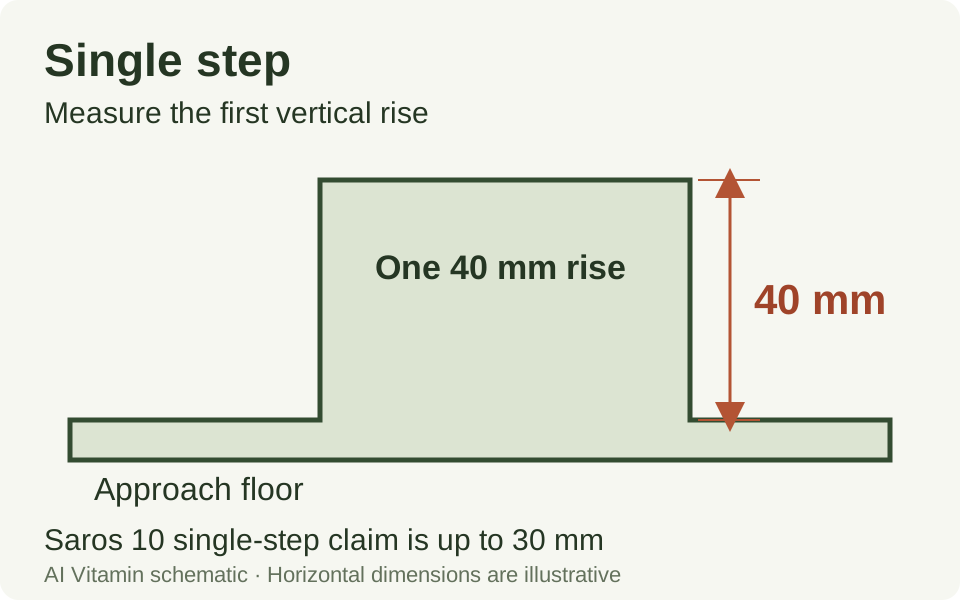
AI Vitamin schematic. A single 40 mm rise exceeds the published 30 mm single-step claim for Saros 10. The drawing is not a robot test or a scale plan.
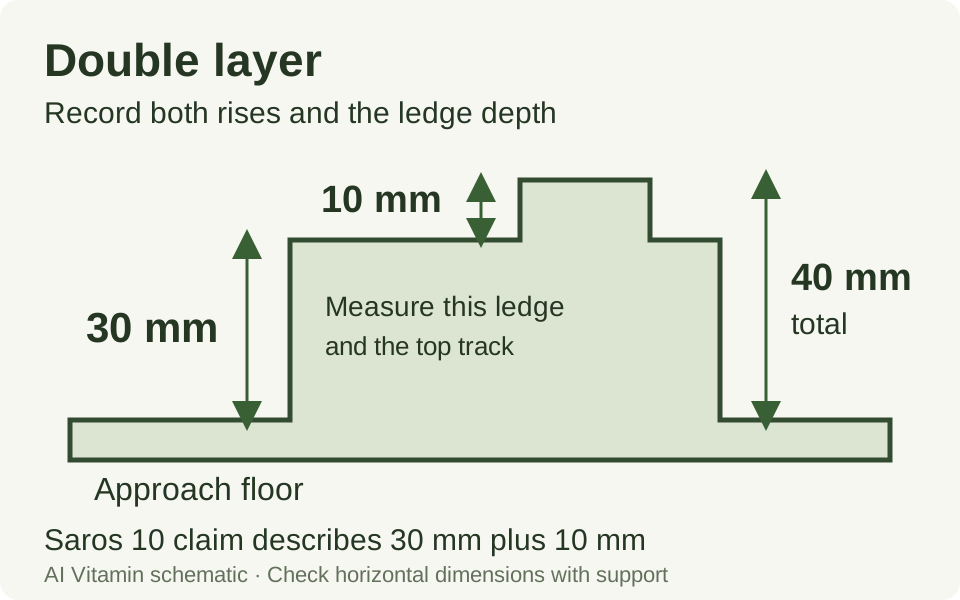
AI Vitamin schematic of the height breakdown in Roborock's claim. Horizontal dimensions are illustrative. Measure the ledge, track and total depth at home and ask support to confirm them.
When comparing robot vacuum single vs double threshold claims, keep the separate rises attached to the overall number. A 30 mm ledge with another 10 mm rise matches the stated height breakdown, but its horizontal geometry still needs confirmation.
A doorway can also have two equal-height rails separated by a recess. Sketch both rails and their gap. The Saros 10 footnote does not define every profile sold as a double threshold, and it does not publish a minimum ledge depth or rail spacing. Ask about your drawing rather than assigning it a passing label yourself.
Match Your Measurements to the Exact Model
Keep the model name, sales region and source footnote together when checking robot vacuum threshold clearance. Our Saros 10 product details provide the directory record and official manufacturer link. Confirm the version in your shopping cart before applying its specifications.
| Model or document | Region | Published condition | What to confirm for your route |
|---|---|---|---|
| Saros 10, single-layer claim | US | Up to 30 mm, based on internal testing | Both approaches, edge profile and clear floor space |
| Saros 10, double-layer claim | US; cross-checked on the global page | 30 mm plus a 10 mm track, up to 40 mm total | Ledge depth, track dimensions and gaps |
| Saros 10 with Refill and Drainage System, installation guidance | US page; version-specific manual | No threshold, track or step higher than 20 mm between dock and cleaning area | Whether this dock version suits the entire route |
| General Roborock threshold FAQ | English support page listing older models | Model-specific figures for the devices named there | Use an exact current model source for a new purchase |
The global Saros 10 page, footnote 2, confirms the same height split. Neither threshold footnote names a minimum firmware version. Ask support whether a particular setting or firmware is needed for your doorway.
The general Roborock threshold FAQ lists older models with 20 mm crossing figures and a separate exception. It does not name Saros 10. Treat its answer as applying to the models it lists; use the newer model's own specification for this purchase.
Check the Dock Version Before Buying
The refill and drainage manual, section B2, calls for no threshold, track or step higher than 20 mm between the dock and cleaning area. The US product page's Refill and Drainage System installation section gives the same condition. Check it separately from the chassis claim.
Ask which installation guidance applies to the dock you intend to buy. Keep the answer with your worksheet, especially if the dock would sit beyond your tallest threshold.
Can a Robot Vacuum Cross a 2 cm Threshold?
A 20 mm measurement falls below the Saros 10 single-step figure, but the shape and route still need checking. Give support the heights from both sides and the approach photos. Allow for uncertainty in your measurements, and avoid treating a reading exactly at a stated limit as spare clearance. There is no universal safety margin in the sources reviewed here.
If the manufacturer cannot confirm your profile, browse the Home and companion robots directory and repeat the check for another exact model. Carry the same worksheet into the next comparison.
Check the Route During the Return Window
Read the seller's return policy before ordering. Confirm the deadline and whether trial cleaning affects eligibility. Once the robot arrives, check the routes early enough to act on the result.
Set up the dock according to the manual supplied with your version. Record the app and firmware versions, complete the recommended setup and use any threshold settings the manufacturer identified. Keep the doorway as measured. If you move furniture or change a floor strip, update the worksheet.
Observe a complete cleaning trip from the dock to the room and back, using the modes you expect to use. If you carry the robot into a room, record that intervention. It leaves the route from the dock unchecked.
Record whether it crosses, hesitates, needs another approach or gets stuck. Note scraping, lost traction and any request for help. If a robot vacuum gets stuck on a threshold, stop the run and photograph the point where it catches. Send that observation with your dimensions to support before repeating attempts that could damage the robot or floor.
| Route check | Record at home |
|---|---|
| Dock to target room | Doorway, mode, crossing outcome and any intervention |
| Target room back toward dock | Outcome in the reverse direction |
| Return to dock | Whether it reaches and docks without being carried |
| Repeat run | Any different result, changed setting or changed room layout |
Choose a repeat-run count for your own check and write it down. A few successful trips describe those trips; they do not establish a reliability percentage. Keep recurring problems separate from a single successful crossing.
Keep the seller's deadline on the same sheet. If a route remains unresolved after support reviews it, decide whether to return the device while that option is still available.
Sources and Editorial Note
Official documents checked October 3, 2026. The measurement worksheet and schematics are original AI Vitamin aids. Home compatibility remains untested.