

Brilliant Labs Frame
Frame | Brilliant Documentation | AI Vitamin
- Brilliant Labs Pte. Ltd.
- Singapore, Singapore
AI summary
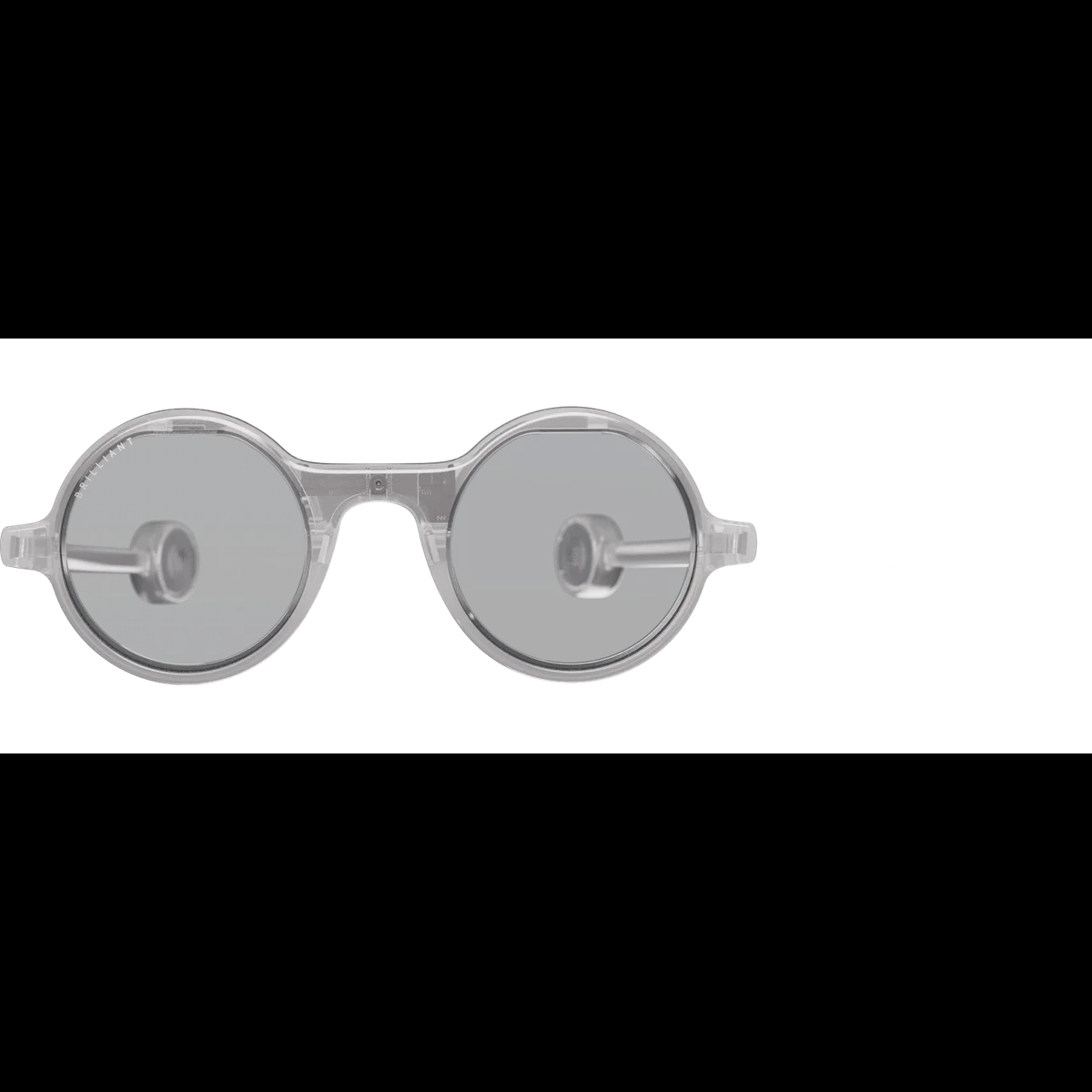
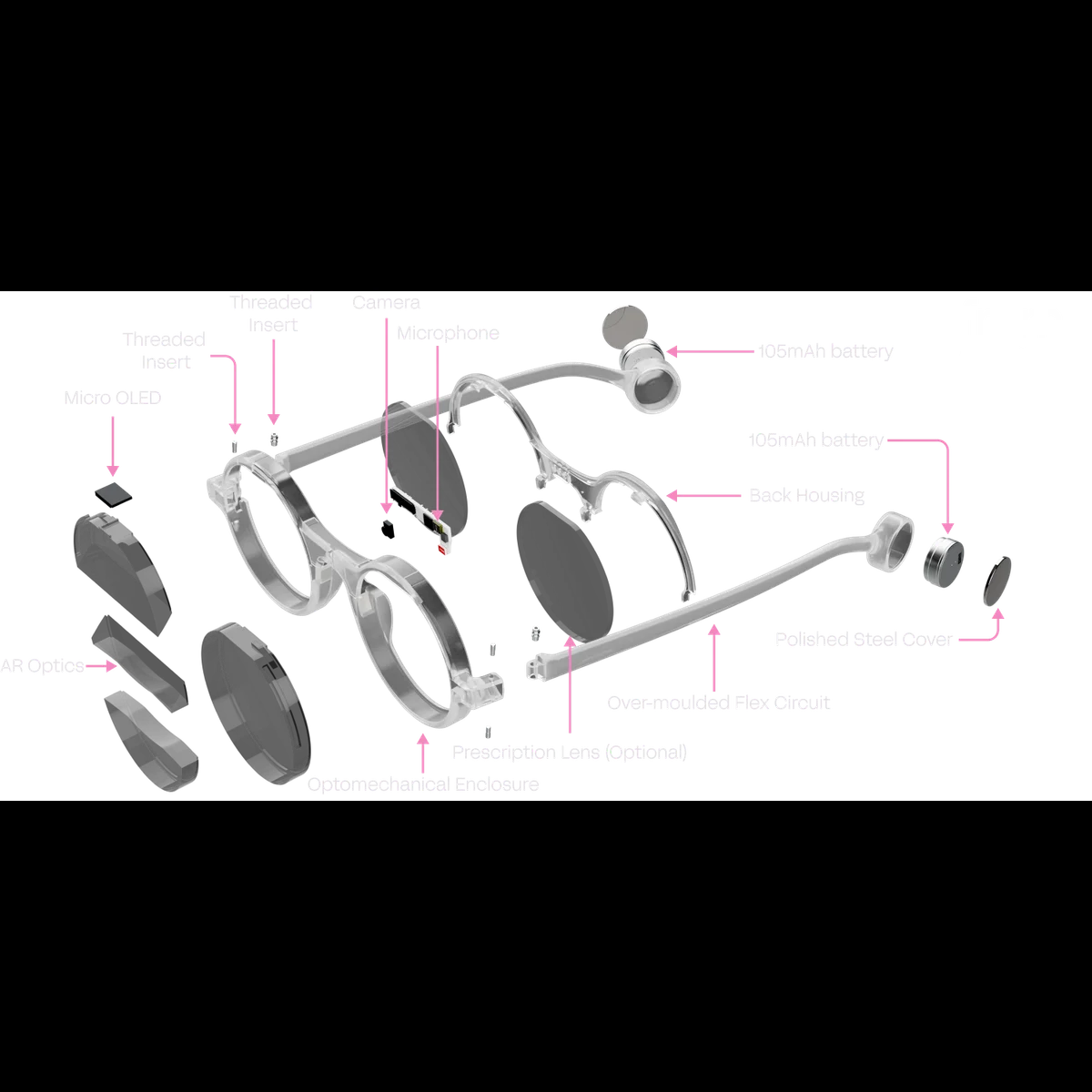
Brilliant Labs Frame is an open, developer-oriented AI-glasses platform with a 640×400 color micro-OLED heads-up display, 20° field of view, 720p camera, microphone, motion sensing, Bluetooth 5.3 and Lua OS, paired with Noa-compatible mobile apps and a USB-C charging dock for computer-vision and contextual-assistance projects.
Pricing
Hardware options
| Option | Price | Notes |
|---|---|---|
| Brilliant Labs Frame | No current official price listed (not offered on Brilliant Labs' current storefront). | — |
Specifications
Key hardware details first, followed by the complete product specification.
Key specifications
- Camera
- Front-facing OmniVision OV09734, captures 1280×720 RGB
- Core task delivery status
- Transparent heads-up display with camera, microphone, sensors and Lua apps
- Connectivity
- Bluetooth 5.3
- Display capability
- 0.23-inch 640×400 RGB micro-OLED, transparent HUD, 20° FOV
Capabilities & dependencies
- Phone dependency
- Frame-compatible mobile app required for first pairing, updates and NoaKeep the companion app open and Frame in close range during firmware updates.
- External dependencies
- Bluetooth-connected compatible app; optional NoaOfficial documentation lists Noa and Frame-compatible apps; it does not state an offline AI mode.
Compute & software
- Processor and FPGA
- Nordic nRF52840 Cortex-M4F (64MHz) + Lattice CrossLink-NX LIFCL-17 FPGAnRF52840: 1MB flash, 256KB RAM. FPGA: 17K logic cells, 432Kb block RAM and 2.56Mb RAM.
- Operating system
- Full-featured Lua OSSupports Lua scripting, Bluetooth remote access and OTA firmware.
Connection & companion
- Compatible platforms
- Noa on iOS and Android; Android APK via GitHubOfficial documentation names the Apple App Store, Google Play Store and a GitHub Android APK.
Engineering limits
- Operating conditions
- 0–45°C operating; −20–60°C storageOfficial electrical ratings: Frame 5.1V nominal charging, 6.4V max; cradle USB 5.1V nominal, 7V max.
Optics & frame
- Lens type
- Thin/light 6mm lenses (without optional prescription)Official documentation also identifies AR optics in the Frame assembly.
- Prescription lens compatibility
- Optional personalized prescriptionsOfficial documentation includes a prescription-lens component and an Rx clip 3D model.
Power & charging
- Battery life
- 210mAh built-in rechargeable lithium-ion batteryTwo 105mAh lithium-ion cells. Official documentation does not list runtime.
- Charging method
- Automatic charging on Mister Power cradle; USB-C powerFrame powers off and starts charging on the cradle; use USB-C to charge the cradle and docked Frame.
- Charging time
- Around 2 hours (Frame docked with cradle)The white cradle LED turns off when charging is complete.
- Required accessories and consumables
- Mister Power charging cradle; sim-card tool for first pairingInitial pairing requires the cradle connected and its pairing button held for 3 seconds with a sim-card tool.
- Case battery
- 140mAh charging cradleMister Power charges Frame automatically and is USB-C charged.
Privacy & data
- Sensors and data capture
- 720p camera, single MEMS microphone and 6-axis IMUFront-facing OV09734 camera; ICS-41351 microphone; MC6470 accelerometer/e-compass with tap detection.
- Data upload and processing
- Frame may process contextual environmental data for heads-up informationPer Brilliant Labs product-suite privacy policy; raw audio/video is not retained beyond immediate processing.
- Data retention
- Raw audio/video not retained beyond immediate processingProduct-suite privacy policy says optional Memory is private/encrypted and account-deletion data removal occurs within 30 days.
- Privacy controls
- Optional Memory is described as private and encryptedThis is from Brilliant Labs’ product-suite privacy policy and may depend on account and service configuration.
- Export and deletion
- Account deletion triggers personal-data deletion within 30 daysFrom Brilliant Labs product-suite privacy policy.
Support & ownership
- Security-update status
- Over-the-air firmware updatesFrame-compatible apps notify users; keep Frame charged and nearby during update.
FAQ
How do I charge my Frame?
Your Frame will automatically power off, and start charging whenever it is placed onto the charging cradle (aka Mister Power). The charging cradle provides an extra helping of battery power for when you’re on the go. To charge both Frame and the charging cradle, use any USB Type-C power supply. The cradle and Frame when docked together will take around 2 hours to fully charge. The white LED on the cradle will turn off to indicate that charging is complete.
How do I set the bridge height?
Choosing the correct nose bridge adaptor is key to seeing the full display area. You can choose between 3mm, 2mm or no nose bridge adaptor to set the correct level.
How do I connect to my Frame for the first time?
Ensure your Frame is charged, and then with the charging cradle connected, use a sim card tool and hold the pairing button for 3 seconds. Then remove the dock, and from any Frame compatible app, such as Noa, press connect, and then tap pair.
How do I update my Frame?
Whenever software updates are available for your Frame, you’ll be notified in your Frame compatible apps. Ensure Frame is well charged before updating to prevent partial updates and having to start again. Be sure to keep the app open and within close range of your Frame during the entire update.
Where can I download Noa?
Noa is available on both Apple App Store for iOS and Google Play Store for Android. You can also download the Android APK directly from our Github.
Compare similar devices
Bose QuietComfort Ultra Headphones (2nd Gen)
Shop Bose QuietComfort Ultra Headphones (2nd Gen) | Bose | AI Vitamin
View device
Timekettle New T1
NEW T1 Handheld Translator Device – Timekettle | AI Vitamin
View device
Timekettle WT2 Edge
W4 vs WT2 Edge/W3 Translation Earbuds: A Comprehensive Comparison – Timekettle | AI Vitamin
View device