
Smart Glasses Explained by Camera, Display, Audio, and Phone Dependence
A practical guide to camera-equipped AI glasses, glanceable displays, USB-C screens, audio and the phone or network each design still needs.
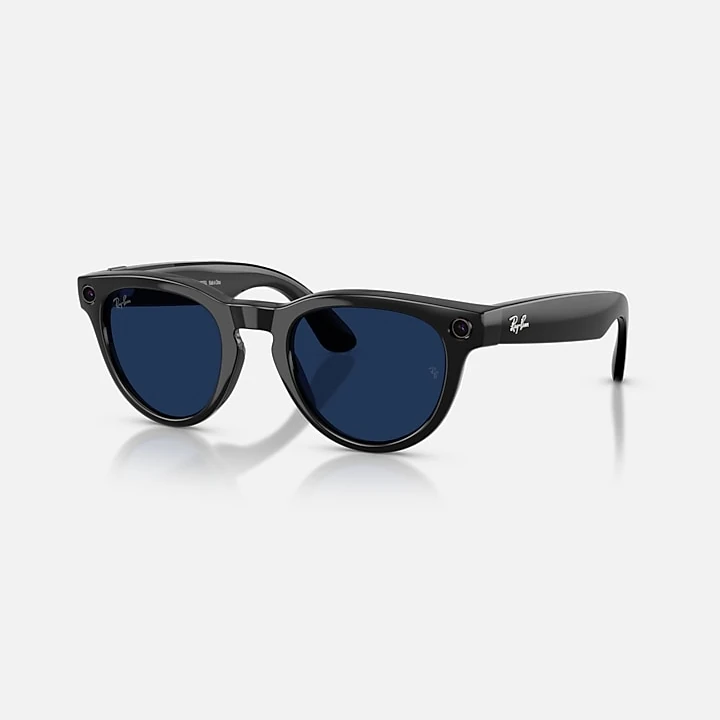
Two pairs of smart glasses can look similar in a product grid and do very different jobs. One records a point-of-view clip and sends it to a phone. Another shows a few lines of text above your vision. A third works as a screen for a phone or laptop. Some newer frames carry their own processor and storage.
The label smart glasses does not tell you which experience you are buying. It helps to compare how each design handles its camera, display and audio, and how much it depends on a phone. The examples below come from AI Vitamin product listings and manufacturer pages checked on September 23, 2026. Features and availability vary by market and software version.
A camera changes what the glasses can do
A camera gives the glasses a view of the scene in front of you. That can mean taking a photo or video without lifting a phone. In products with visual AI, the camera can also provide an image for a question about a sign, object or place.
Ray-Ban Meta (Gen 2) is a useful example of camera-first glasses with open-ear audio and no in-lens display. Its current listing describes a 12-megapixel camera and video capture up to 3K. A front capture light signals when the glasses take a photo or record video. Asking Meta AI about something in view sends an image to Meta cloud processing. Ray-Ban says photos processed with AI are stored and used to improve Meta products and train its AI with trained reviewers, under its current privacy terms. That is a concrete detail to read before enabling visual AI.
Meta Ray-Ban Display puts a display beside the camera. The official help page says the wearer can preview a capture on the display, while camera media needs to be imported through the Meta AI phone app before it can be reviewed or shared. The capture light still matters. A screen changes what the wearer can see, while the camera changes what the glasses can collect.
A camera-free design has a different boundary. Even G2 has microphones and a small monochrome display, with no camera or speakers on the frame. It can accept voice input and show text prompts. It cannot inspect a scene through its own camera. Camera-free glasses can suit people who want discreet information without a lens pointed outward.
A display can show a prompt or a whole screen
The word display covers several very different things. A narrow monochrome panel can show a direction, caption or short response. A micro-OLED can place a large virtual screen in front of you. Full-color waveguide glasses can layer short cards over the view ahead.
Even G2 sits near the text end of that range. Its manufacturer documents a dual micro-LED display, four microphones and Bluetooth Low Energy connection to a phone. The display is designed for brief information. The phone handles the computing and apps.
XREAL One is closer to a personal external monitor. It has a 1080p Micro-OLED display, 120 Hz refresh rate and an XREAL X1 chip for native 3DoF screen modes. Its content still comes from a compatible phone, computer or other video source through USB-C. The source device needs USB-C DisplayPort video output. An ordinary USB-C charging port is not enough. XREAL Eye is an optional camera accessory, so the glasses can add capture when the owner chooses that extra hardware.
RayNeo X3 Pro AI+AR Glasses and Rokid Glasses with Display combine cameras with in-view displays. RayNeo lists full-color binocular MicroLEDs, a 12-megapixel main camera, a spatial camera, 32 GB of storage and its own AI operating system. Rokid lists a MicroLED waveguide display, a 12-megapixel camera, directional speakers and a four-microphone array. Their overlays can carry directions, translation or prompts while leaving the wearer looking ahead.
Those screens are better for quick information than a laptop-sized workspace. A wired display is the more natural fit for films, games or a large virtual monitor. A prompt display makes more sense when the useful answer is a short glance.
Audio has an input side and an output side
Microphones and speakers do different work. Microphones hear commands, calls or conversations. Speakers return music, calls or spoken AI answers. A product can have several microphones and no speaker at all, as Even G2 does. A feature list that says voice control does not promise spoken replies or music playback.
Ray-Ban Meta and Rokid Glasses include speakers aimed toward the wearer, while XREAL One lists audio by Bose. Open-ear audio leaves more of the surrounding sound available than sealed earbuds. It can be convenient for directions and short answers. In a quiet room, a nearby person may still hear some playback, so audio privacy depends on volume, environment and speaker design.
The microphone count also says little about when recording begins. Look for a physical capture control, a clear recording indicator, a mute option and an explanation of where speech is processed. A camera-free frame can still hear nearby speech. Audio and camera permissions deserve separate attention.
Phone dependence has more than one layer
Some glasses need a host device for the picture itself. XREAL One uses its own chip for spatial display behavior, while a compatible phone, computer or console supplies the content. If the source is not with you, there is no image to show.
Other glasses pair wirelessly with a phone that runs most of the companion experience. Even G2 connects over Bluetooth LE, and its developer documentation says apps run on the phone while the glasses act as the screen. Ray-Ban Meta requires a supported phone, the Meta AI app, a Meta account and internet access for connected AI features. The frames can perform some capture and audio controls without the full companion service, but setup and many useful features rely on the phone.
Meta Ray-Ban Display still requires the Meta AI mobile app and a supported phone for setup and pairing. Ray-Ban says some captures and voice controls work without Wi-Fi, while Meta AI, importing captures and software updates need wireless internet. A display makes information easier to see. It does not remove the account, app or network behind those services.
RayNeo X3 Pro sits closer to a standalone computer. It has its own processor, operating system, storage, Wi-Fi and battery. RayNeo says a phone remains useful for setup, connectivity, hotspot access and companion features. Rokid also lists built-in processing, storage, Wi-Fi and Bluetooth. Its manufacturer says the Rokid app is required for pairing, settings, media, AI, translation and subtitles, so the on-frame processor does not remove the companion-phone step. Standalone hardware reduces tethering; it does not make every service local.
Before buying, check what still works with the phone switched off, outside Bluetooth range and without Wi-Fi. Those are three different conditions. A camera may still save a file locally when the AI assistant cannot answer. A display may still show a wired source while cloud search is unavailable. The distinction determines whether the glasses are a screen, a companion to a phone or a computer you can wear.
Match the design to the task
Choose Ray-Ban Meta (Gen 2) if hands-free capture, calls and open-ear audio matter more than seeing information in the lens. Choose Even G2 for short text prompts with a camera-free design. The microphone array can take voice input, while its display returns concise information.
Choose XREAL One when you want a portable virtual screen for a compatible phone, computer or game device. The glasses add spatial screen controls, and the connected device provides the picture. For camera, color overlays and more computing on the frame, compare RayNeo X3 Pro, Rokid Glasses with Display and Meta Ray-Ban Display. Their phone and network requirements differ, so read those sections before deciding that a frame is fully standalone.
Start with the moment you want the glasses to improve. If it is a photo, examine capture controls and the recording light. If it is a direction or translated phrase, focus on display legibility and language support. If it is a film or a game, check the video connection and power draw on the host. If the phone can stay in your pocket, verify which parts of the experience continue without it.
Browse wearable and smart-glasses listings to compare the current devices. The manufacturer pages below describe the features cited here. Product pages, prices and regional support can change.